
US Visa / DS-160 Photo
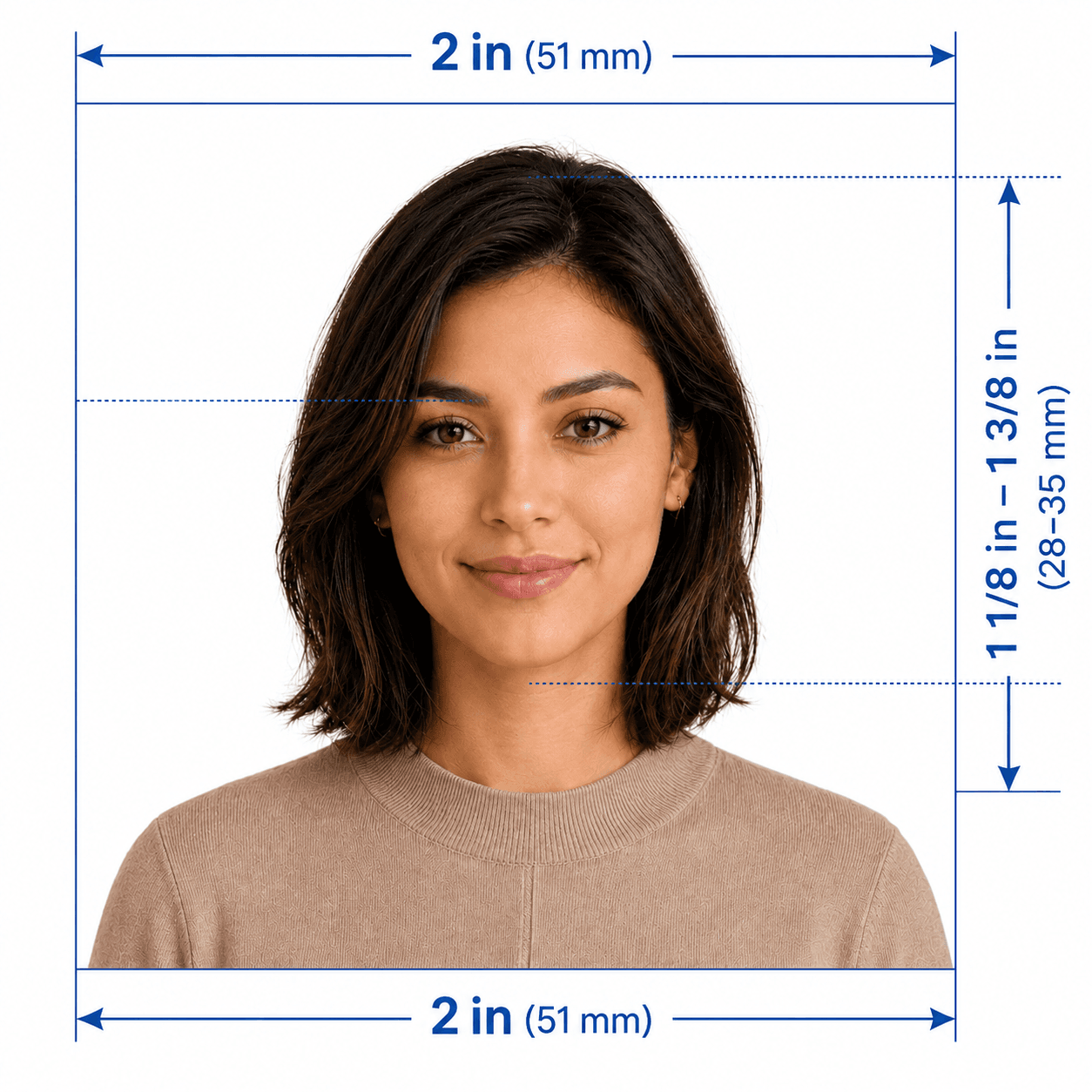
- Photo size
- 600×600 · JPG
- Max file
- ≤ 240 KB
- Print size
- 2×2 in · 51×51 mm
- Head in frame
- 50–69%
- Background
- white or off white
Create approved photo
$3.99Government document readyLive12,847 photos processed
Five stars are decorative only, not a user rating.Trusted to comply with government file specs for upload.
Done in ~60 secondsWe crop, check the background, and size your phone photo. For passport, visa, ID, driver's license, or immigration. Pick your country and form first — upload, preview free, then pay $3.99 to download.
What's includedDone in ~60 secondsFiles deleted after 24 hours
Start here
Search
56 presets · type a country, visa, or form code
Pick a row to open the flow with that document already selected.
12k+
Photos made
99.8%
Pass first check
120+
Countries
1m
To preview
How we compare
We size your photo to the published spec for your form, show a watermarked preview for free, and charge only for the clean, upload-ready file.
The symbols compare how each path usually performs for digital portal uploads—not a guarantee. Acceptance always rests with the agency or website you file with.
| Feature | UploadPhoto.org | Walk-in studio | Other online |
|---|---|---|---|
| One-time price | $3.99 · one job | $15–$35+ · travel & wait | $6–$15+ · varies |
| Where rules come from | Gov sources listed per preset | Print sizes common · portal JPEG rules vary | Generic to spec-aware · check sources |
| Pixels & file cap | Width, height, format, KB target | Great print · CEAC-style caps differ | Close · not always exact cap |
| Preview before pay | Always · watermarked + readout | Pay before you leave | Often paywalled early |
| Plain readout | Sharpness, light, hints + output checks | Little portal-style feedback | None to basic · rarely preset-specific |
| 4×6 print sheet | Included when preset ships it | They print · portal file extra step | Often add-on or digital-only |
| Photo retention | ~24h target · see privacy | Shops may keep archives | Policies unclear |
| Convenience | ~1 min to preview · browser | Travel + queue · 15–30+ min | Fast when it fits your form |
Studios are ideal when you want someone on-site. Other sites range from simple resizers to full services—we focus on digital files built to published numbers.
The embassy or website has the final word. We build to the published specs and flag obvious misses before you pay.
Tap a flag — each page lists the official sources we mirror, the presets we ship for that territory, and a direct path into upload.
One file built for the form you chose, a print sheet when that form includes it, and a short readout. Full pricing.
Jobs delete after 24 hours. Download links are short-lived.
We match the published numbers. The officer or website still decides.
Get the file the website asked for.